
-
IMPORTANT ANNOUNCEMENT: Please read THIS THREAD about a rebrand for SF.
How Are You Feeling Right Now?
- Thread starter UNREGISTERED0000
- Start date


Bored and still sick. Wrapped presents fora half hour and now have to rest. Driving me crazy. Why do I have to get sick?


I think the person meant to "favourite" a page of the forum on your browser (Firefox, Chrome, etc.) so you can always find it directly, but this option doesn't exist on SF. 
The "New Posts" page shows you all the threads on the website that have new posts that you haven't read. Once you open a thread, SF considers you have "read" it, so it won't appear again in the New Posts for you, until another new post is added to the thread, and so on. So it's normal that posts disappear and appear again on that page.
I suggest for you to remember that page (New Posts), but also the "Watched threads" page, which you can find by clicking on Forum > Watched > Watched Threads. This page shows you all the threads that you're watching, meaning either you left at least one post in them, or you clicked on "Watch" in the thread in the obvious purpose to keep watching this thread. I sometimes do that if I want to come back to a thread I've read but I haven't replied yet. The threads you watch that have new posts in them will be shown in bold in that list as well. Posts don't disappear there unless you "Unwatch" them.
Here is the direct link : https://www.suicideforum.com/community/watched/threads
They are the two pages I keep clicking on all day long. :p
Iast question I hope.....I've taken a picture of this post content for referral as I learn what you've described but is there also a way to notate it/place it/store it for myself somehow on the site so that I can return to it specifically/directly for re-viewing as I learn what you are teaching me here?
You've helped me with some understanding of what's actually happening in the movements, thank you for that.
Once I post this reply the only way I know to get to this post again is to go and scroll through my historical content.


Don't worry - we will get to the bottom of this, SF will help you, I'm looking forward to seeing Auri's response she is very clever - more so than I lol
Sure, it would be great if you had people irl to help, but we will get there somehow, someway.
Sure, it would be great if you had people irl to help, but we will get there somehow, someway.

I've just read Auri's helpful response.....will start to work with it. Thank you for caring.

@Auri.
Iast question I hope.....I've taken a picture of this post content for referral as I learn what you've described but is there also a way to notate it/place it/store it for myself somehow on the site so that I can return to it specifically/directly for re-viewing as I learn what you are teaching me here?
You've helped me with some understanding of what's actually happening in the movements, thank you for that.
Once I post this reply the only way I know to get to this post again is to go and scroll through my historical content.


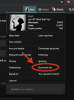
If you click on it, leave a note for yourself if you wish in the space that appears (for example to say what it's about) and click on Submit, this post will be stored in your personal "Bookmarks". These can all be found in your Bookmark List that you can find by clicking on your username in the right top corner of your page. A menu rolls down and there is "Bookmark List".
Last edited:
Yes, can you see the button "Bookmark" at the bottom of every post ?
If you click on it, leave a note for yourself if you wish in the space that appears (for example to say what it's about) and click on Submit, this post will be stored in your personal "Bookmarks". These can all be found in your Bookmark List that you can find by clicking on your username in the right top corner of your page. A menu rolls down and there is "Bookmark List".
If you click on it, leave a note for yourself if you wish in the space that appears (for example to say what it's about) and click on Submit, this post will be stored in your personal "Bookmarks". These can all be found in your Bookmark List that you can find by clicking on your username in the right top corner of your page. A menu rolls down and there is "Bookmark List".
Yes...wonderful.......Can I now go back and bookmark that post of yours since I'm already out of it? If so, how do I get there?
Also, if you have more questions, I suggest you post a thread in the Troubleshooting section and write there so we don't spam this thread more with my long explanations, ok?
 Thank you, but it's really not much. ^^
Of course you can bookmark a post anytime. To get to my post explaining New Posts and Watched Threads? It's on this page on the top.
Also, if you have more questions, I suggest you post a thread in the Troubleshooting section and write there so we don't spam this thread more with my long explanations, ok?
Also, if you have more questions, I suggest you post a thread in the Troubleshooting section and write there so we don't spam this thread more with my long explanations, ok?
 thank you
